 DelayDHD
Your brain has 47 boxes open. Let's close some.
DelayDHD turns the chaos in your head into a calm, 3-state list: Open, Ajar, and Closed. No buried backlogs. No shame. Just momentum.
No credit card needed · 30-day money-back guarantee on paid plans
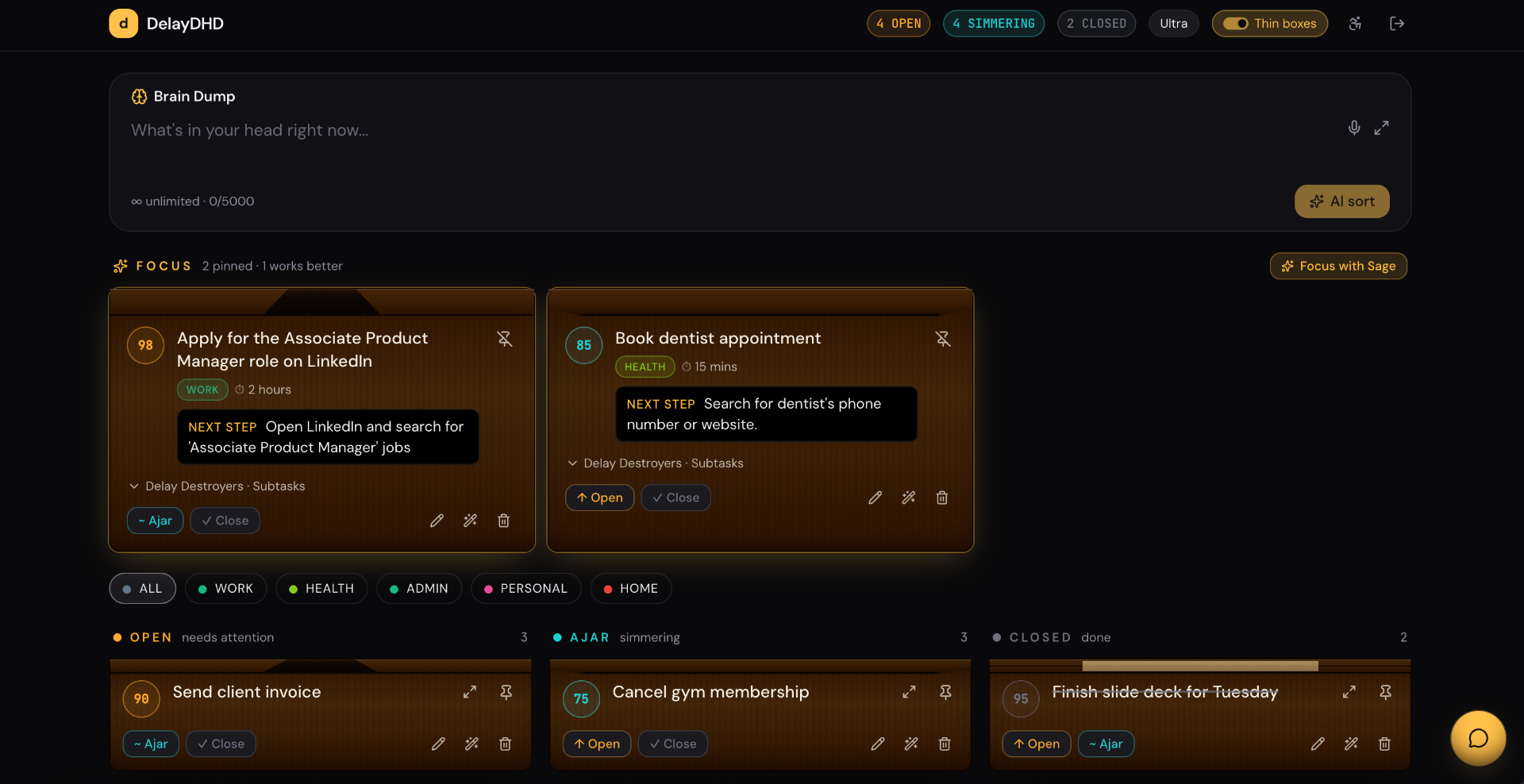
Your whole brain in one calm view — Brain Dump on top, Focus picks the two things that matter, everything else lives in Open · Ajar · Closed.
Sound familiar?
- · 14 to-do apps. None of them stuck.
- · A backlog so long you've stopped opening it.
- · "I'll remember it" → you didn't.
- · The thing you actually need to do is hiding under 200 things you don't.
What DelayDHD does instead
- Dump everything in one box — type, talk, or snap a photo. Sage sorts it into Tasks, Events, Ideas & Memories.
- Triage into 3 calm buckets — Open · Ajar · Closed. Not 47 tags.
- Ask Sage "what next?" — get one clear answer pulled from your real list.
- Sage can edit, move, create and delete tasks for you. You watch the changes happen.
- Project Mode quiets every unrelated task so one thing finally gets your whole brain.
- Actually close the loop. Feel it.
It's not that you're lazy. It's that nothing was built for how your brain actually works.
Every to-do app you've tried was designed for a neurotypical brain — one that finds dopamine in ticking boxes, structure in folders, and motivation in deadlines. Yours doesn't. Here's what the research actually says about why — and how DelayDHD is built around it.
The shame backlog.
A list of 200 ignored tasks doesn't feel like productivity — it feels like proof you're broken. So you stop opening the app.
In DelayDHD: Ajar is permission to put something down without losing it. Nothing rots. Nothing yells. You can come back in a week and your list is still kind.
Everything works for two weeks.
ADHD brains need novelty as a neurochemical requirement, not a preference. Once an app becomes predictable, the dopamine drops to zero — and you abandon it. Every time.
In DelayDHD: DelayDHD keeps the surface calm but the inside fresh: rotating AI prompts, new ways to brain-dump, gentle re-engagement when you drift. Built to survive the six-week wall.
You can't start. Or you can't stop.
Activation and continuation are two of the hardest things an ADHD brain does. Most apps just stare at you and wait. That's not help — that's pressure.
In DelayDHD: Ask the AI 'what should I do next?' and get one clear, doable answer. Start a focused session and the AI sits with you — quiet presence, not a lecture. (Body-doubling, based on the 2025 VR study showing ADHD users finish tasks 27% faster with a body double present.)
You hate sorting, moving, and managing the app itself.
The cruel joke of every productivity tool: the app becomes another job. You spend more time tidying tags than doing the work.
In DelayDHD: The AI does the housekeeping. Drop in chaos — it sorts into Open · Ajar · Closed, rewrites vague items into next steps, and shuffles your list so you never have to.
Streaks, punishments, and red badges make it worse.
ADHD brains are extra-sensitive to shame mechanics. A broken streak doesn't motivate — it ends the relationship with the app.
In DelayDHD: No streaks. No red numbers. No 'you missed a day' guilt. Just a quiet list that's still there when you come back. Wins are celebrated; absences aren't punished.
You work better with someone there — but there's never anyone there.
Body doubling is the single most evidence-backed ADHD productivity intervention. Presence itself is the mechanism — not coaching, not advice.
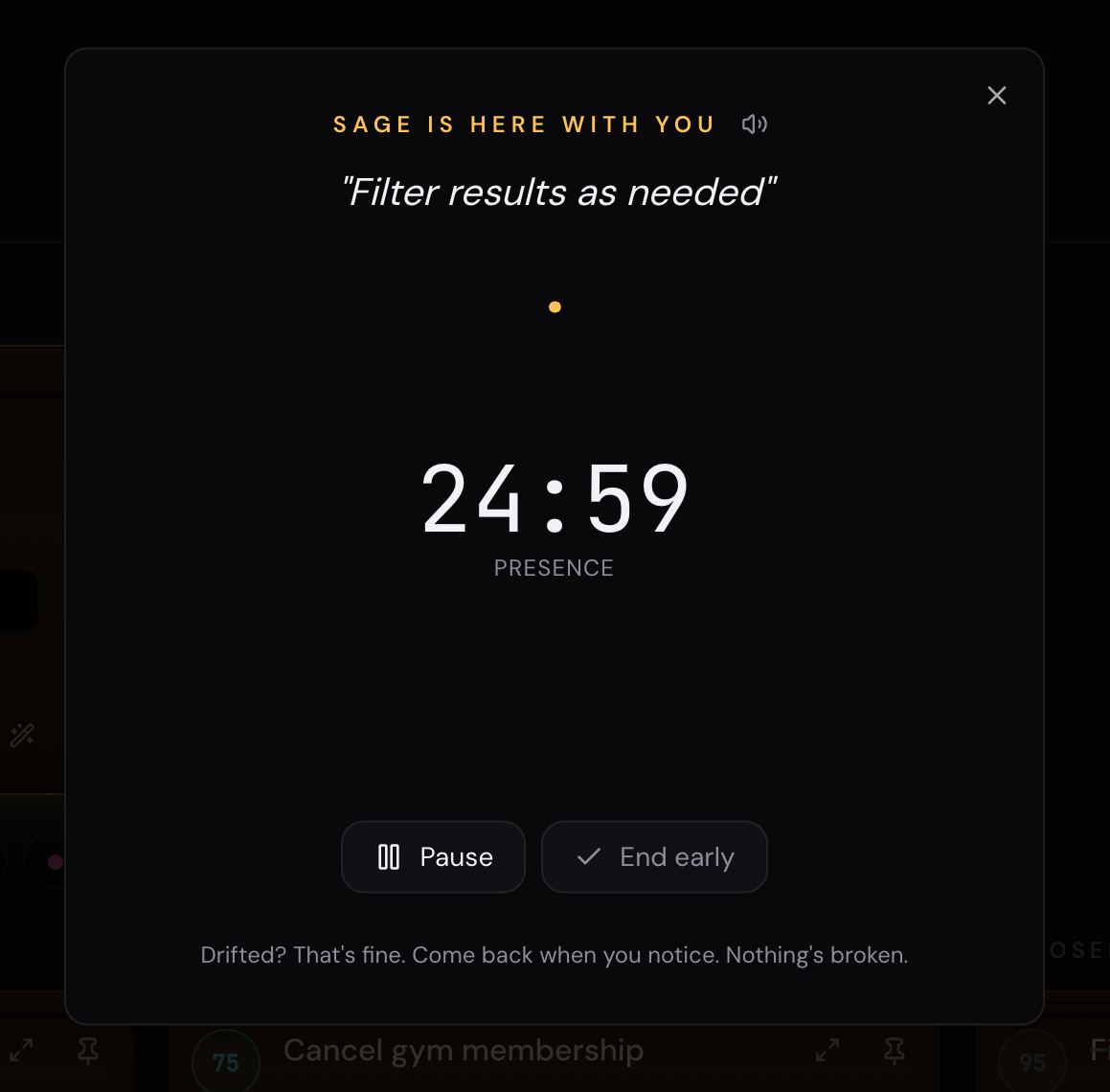
In DelayDHD: The AI body double is mostly silent on purpose. It opens the session, holds the time container with you, and checks in gently if you drift. Pure presence, zero pressure.
Built around the research — not against your brain.
Three-state triage. AI body-doubling. No-shame design. Novelty that refreshes instead of fading. Everything in DelayDHD exists because the science says it works for ADHD brains — and because we got tired of apps that don't.
Try it freeThree states. That's the whole system.
No priorities, no projects, no Eisenhower matrix. Just where the box is right now.
Open
The thing is still actively in your head. It needs a decision or a doing — soon.
Ajar
You've nudged it. Maybe waiting on someone. Not closed, but not screaming either.
Closed
Done, dropped, or decided. The tab in your brain finally closes.
A calm body double, on tap.
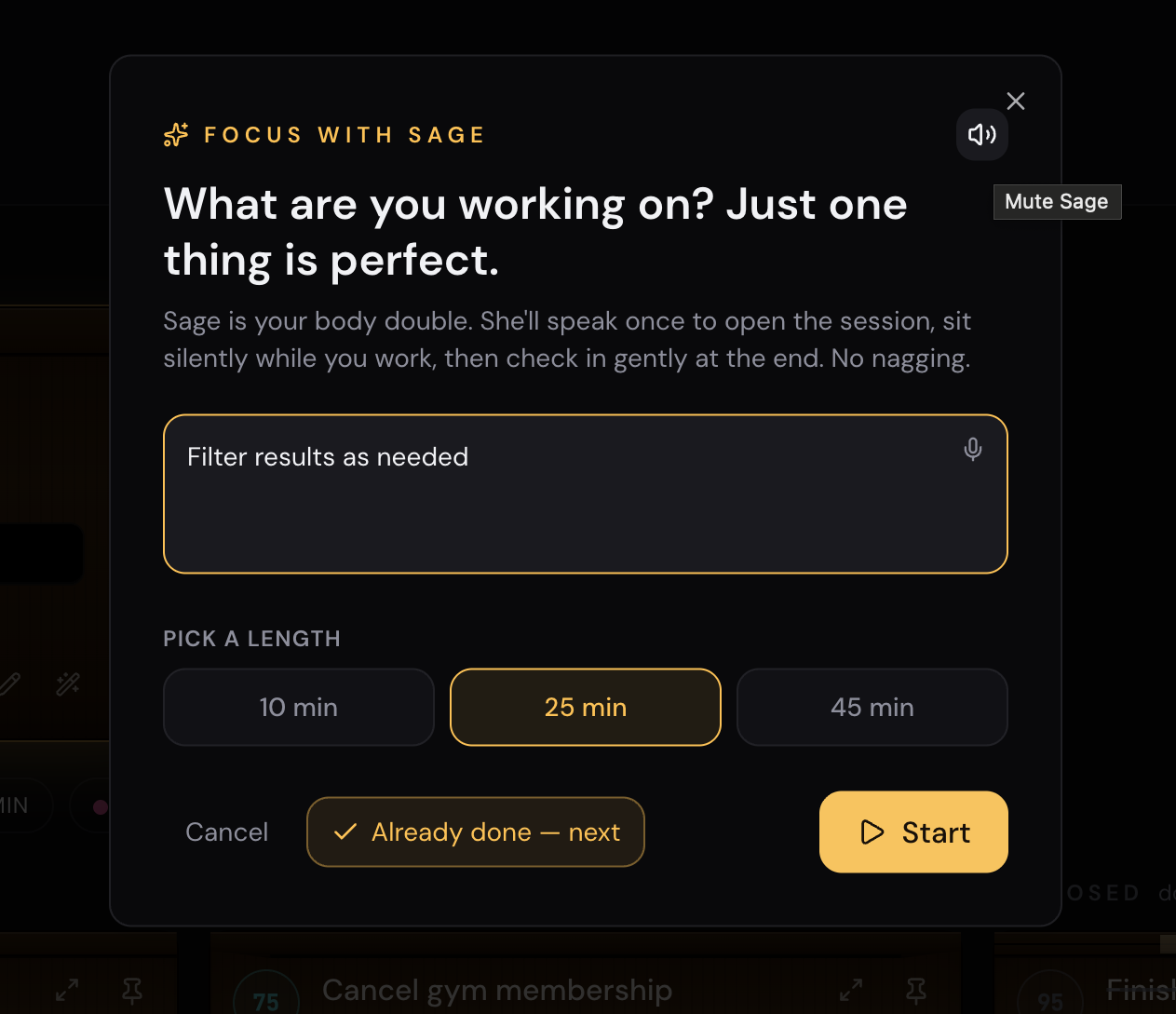
Pick a task. Pick a length. Sage opens the session out loud, sits quietly with you, and checks in gently at the end. No nagging, no coaching mid-session — just presence.
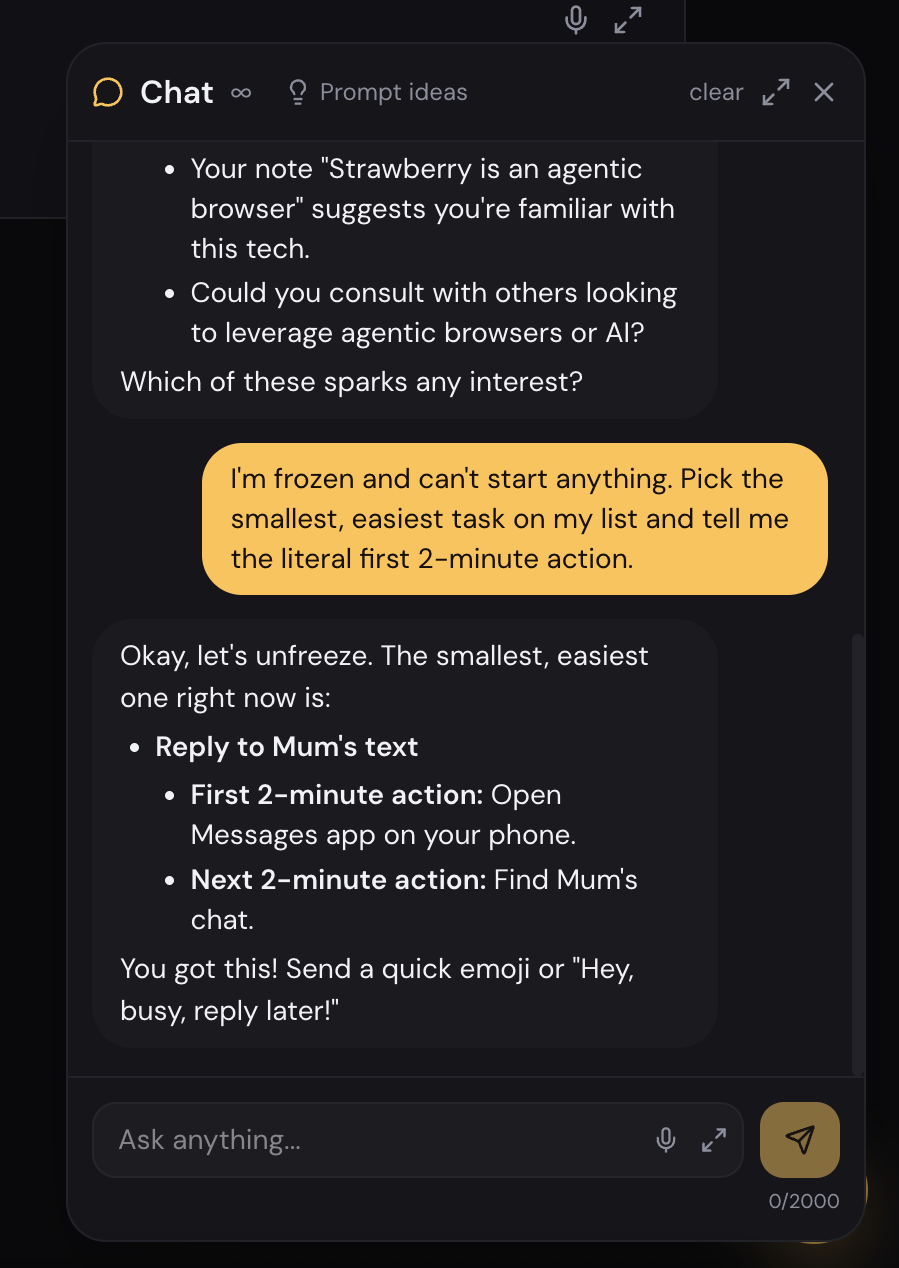
Stuck? Ask for the literal next 2 minutes.
The chat knows your tasks, your notes, and your past brain dumps. When activation is the hard part, it picks the smallest thing on your list and breaks it down into actions you can actually do — not generic advice.
- Pulls from your real list, not made-up examples.
- Tiny, doable next steps — "open Messages app", not "be more disciplined".
- No lectures. No streak guilt. Just unfreezing.
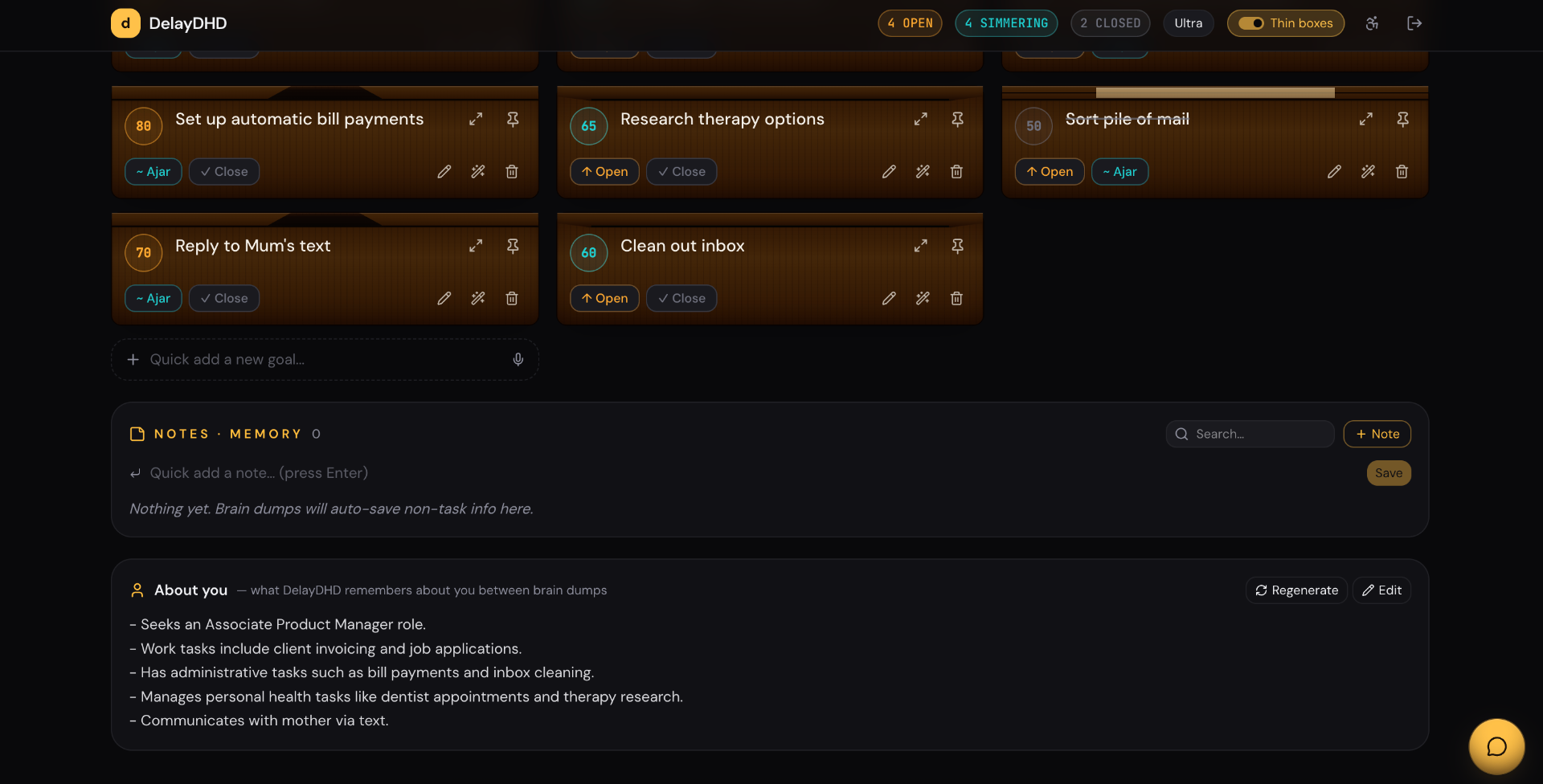
It remembers you, so you don't have to.
Every brain dump quietly saves context — people, projects, working style, what you're avoiding and why — into your AI Memory and a short, editable "About you" summary. Pin what matters, archive what doesn't. Next time you dump, Sage already knows the cast of characters.
Snap a photo. We do the rest.
A whiteboard, a receipt, a school newsletter, a screenshot of someone's text — point your camera at it. Sage reads the image, pulls out the tasks, spots the dates, and drops events straight into your Google Calendar. No retyping. No "I'll do it later" that becomes never.
Photo → Tasks & Events
Sage tells tasks and calendar events apart automatically. A date + time becomes an event. A vague "remember to…" becomes a task with a real next step.
Calendar that doesn't pretend it's not there
Connect Google Calendar in one click. See your week at the top of your dashboard (today-only on mobile, because mobile real-estate is sacred). Add events from a brain dump, a photo, or a "schedule it" button.
Project Mode for focus. Ideas Vault for everything else.
Project Mode
Pick a project — say, "Launch the Etsy shop" — and the dashboard hides everything unrelated. Brain dumps in this mode stay in this project. Sage knows the project context and stops suggesting you reply to your dentist mid-launch. One brain, one rail, one goal.
Ideas Vault
For entrepreneur brains, inventor brains, "I just had a shower thought" brains. Dump a messy idea — Sage clarifies it into a name, type, and next step. Group by project type or status. Promote an idea into a real project the second you're ready. Nothing brilliant gets lost in your notes app again.
One-tap Focus Mode
Toggle Focus and the entire dashboard collapses to your pinned tasks (you choose 1–5). Ambient glow, no columns, no scroll. Toggle it back when you're ready for the rest of life.
Sage actually does things
"Move all my work tasks to Ajar for the weekend." Done — and you see each change happen in a visible Actions block. Sage can create, edit, move, and delete tasks. You stay in the driver's seat; the housekeeping disappears.
Everything in DelayDHD, in one glance
Every feature exists to remove a specific ADHD friction. No bloat. No "pro" upsell maze.
Brain dumps that don't judge
One box. Type, talk, or paste. Sage sorts it into Tasks, Events, Ideas and Memories — and tells you which is which.
3-state triage
Open · Ajar · Closed. The whole system fits on one screen. Closed cards stack visually so your wins are visible without a wall of green ticks.
Photo → tasks & events
Snap a whiteboard, a flyer, a screenshot. Sage reads it, extracts the tasks, schedules the dates.
Voice brain-dump
Talk it out when typing is too much. Same sorting, zero friction.
Sage Chat
Ask "what next?", "rewrite this", or "move all work tasks to Ajar". Sage reads your list and acts on it.
Focus Zone + Focus Mode
Pin 1–5 tasks. One tap mutes everything else. Built for activation, not pressure.
Sage body double
A calm presence for focused sessions. Opens, holds the time with you, checks in gently at the end.
Google Calendar
Week-view on desktop, today-view on mobile. Add events straight from tasks or photos.
Project Mode
Hide everything unrelated. Brain dumps stay scoped. Sage gets the context.
Ideas Vault
Catch and clarify messy ideas before they evaporate. Promote to a real project when ready.
AI Memory + About You
Pinned notes, recency-weighted recall, editable "about you" summary. Sage learns your shape.
Magical Focus board
Drag, resize and rearrange your focus cards. A mouse-trail spotlight, because dopamine.
AI priority scoring
Tasks get a 1–10 score based on your context. Hover for the why. Override any time.
Installable PWA
Add to your home screen and DelayDHD acts like a real app — offline-resilient, full-screen, logo on tap.
Built for noisy minds
No streaks, no red badges, no shame mechanics. Skip a week — your list waits kindly.
Your data stays yours
Export any time. Cancel any time. No dark patterns.
Privacy-first
Row-level security on every table. Your dumps are yours. We never sell data.
30-day money-back
Try a paid plan. If it doesn't click, we refund you. No forms, no "are you sure".
Free forever. Paid when you want more brain dumps.
- Unlimited tasks on every plan
- Up to 100 brain dumps/month on Pro
- Unlimited brain dumps & AI chat on Ultra
- Cancel any time — keep access until period end
- 30-day money-back guarantee
- No ads, ever
Read up on how ADHD brains actually work.
How to Overcome ADHD Task Paralysis
Why your brain freezes — and the 3-state triage that gets you moving.
Read 6 min readADHD & Procrastination: Why You Can't Just "Start"
It's not laziness. It's executive function — and here's what works.
Read 5 min readWhy Your To-Do List Is Lying to You
Six things that actually work for ADHD brains.
ReadQuick questions
Is this really for ADHD or is it just branding?+
Built by an ADHD brain, for ADHD brains. No streaks to break, no guilt-tripping notifications, no 12-field task forms. The whole point is to lower friction so the list actually gets used.
What's the difference between Open and Ajar?+
Open = still loud in your head, needs action. Ajar = you've touched it (sent the email, made the call, deferred it) but it's not done. Closed = done, dropped, or decided.
Do I need to pay to try it?+
No. Start free, brain-dump as much as you want. Upgrade only when you hit the limits and want more.
What if I cancel?+
You keep access until the end of your billing period, and your data stays yours. 30-day money-back guarantee on paid plans.
Close the loop. Quiet the noise.
Free to start. Five minutes to your first closed box.
Get started free